
Eelios is a dynamically typed interpreted programming language. The interpreter is written in TypeScript without any major dependencies and uses Node.js for the runtime.
An example program
The program prompts the user for the maximum iteration depth and render resolution. It then proceeds to render a part of the Mandelbrot set to the output using the provided values.
[
  centerX <- -0.75,
  centerY <- 0,
  width <- 3.5,
  height <- 2,
  characters <- [".", ",", ":", ";", "!", "O", "#", "@"],

  # Only defined for x >= 0
  floor <- | x: Number | -> Number eval x - (x % 1),
  ceil <- ( x: Number ) => Number [
    if x = floor(x) then eval x
    else eval floor(x) + 1
  ],

  # Get a number from the user
  getNumber <- | message: String | -> Number [
    n <- 0,
    valid <- false,
    while valid = false do [
      number <- input(message),
      if (isNumber(number)) & (toNumber(number)) > 0 then [
        valid <- true,
        n <- toNumber(number)
      ] else [
        print "Please try again."
      ]
    ],
    eval n
  ],

  # Retrieve render configuration
  maxIterations <- getNumber("Maximum number of iterations?"),
  renderWidth <- getNumber("Width of the render?"),
  renderHeight <- getNumber("Height of the render?"),

  # Compute a point
  computePoint <- ( pointX: Number, pointY: Number ) => Number [
    x <- 0,
    y <- 0,
    i <- 0,
    while i < maxIterations & x ^ 2 + y ^ 2 <= 2 ^ 2 do [
      xTemp <- x ^ 2 - y ^ 2 + pointX,
      y <- 2 * x * y + pointY,
      x <- xTemp,
      i <- i + 1
    ],
    eval i / maxIterations # 0 < x <= 1
  ],

  # Render a point
  startX <- centerX - (width / 2),
  startY <- centerY + (height / 2),
  renderPoint <- ( renderX: Number, renderY: Number ) => String [
    x <- startX + renderX / (renderWidth - 1) * width,
    y <- startY - renderY / (renderHeight - 1) * height,
    point <- computePoint(x, y),
    index <- ceil(point * len(characters)) - 1,
    eval characters[index]
  ],

  # Render the Mandelbrot set
  y <- 0,
  while y < renderHeight do [
    line <- "",

    # Render a line
    x <- 0,
    while x < renderWidth do [
      character <- renderPoint(x, y),
      line <- line + character,
      x <- x + 1
    ],
    print line,

    y <- y + 1
  ]
]
Many features of the language are being exercised in the program, some of which include;
- Control flow (
if..then..elseandwhile..do), - Functions and closures (
| .. | -> ..and( .. ) => ..), - Input / Output (
input ..andprint ..), - Unary and binary operators (
+,-,<=,&, etc.), - *Built-in functions (
isNumber,toNumber,len, etc.), - Data types (
Strings,Numbers,Arrays, etc.), etc.
*These are technically Instructions, but they will be referred to as functions as they are indistinguishable from each other for the most part. The only exception is how the parser handles these differently, quirks of which are observable on line 21 of the mandelbrot.ee program where the Instructions need to be wrapped in parentheses to nudge the parser in the right direction.
Open source
Eelios is fully open source. The source is available on GitHub. The README.md contains comprehensive documentation of the language.
The jam
I came across a programming language jam by Replit. The spirit of the jam was to "bring fresh and wild ideas to programming languages". This was the opportunity I capitalized on to create this language.

The gimmick
Eelios programs are composed of Instructions (typically referred to as "statements" in other languages). However, unlike in other languages, Instructions are treated as data in Eelios, data which can be manipulated at runtime.
[
  instruction <- print "World", # does *not* execute
  #    ╰ data type of this variable is `Instruction`
  print "Hello",
  instruction # prints "World" to the output
]
> Hello
> World
What is an Eelios program?
An Instruction in Eelios is either just a single Instruction (like input "Your name?") or an array of Instructions (like [a <- "A", print a]). A hypothetical definition of the Instruction data type in TypeScript would look something like the following;
type Instruction = Instruction | Array<Instruction>;
An Eelios program, as a whole, is defined to simply be an Instruction. Observe that all Eelios programs presented so far are arrays of Instructions, which is perfectly acceptable according to the definition of an Instruction.
print "Hi"
> Hi([print "A", [[print "B", ([])], print "C"]])
> A
> B
> CEelios runs the program by executing the top level Instruction (which is the whole program). If the Instruction is an array, Eelios executes each sub-Instruction in order. As demonstrated by the gimmick.ee program, Eelios does not execute Instructions that are not at the top level by default, instead they are treated as data which can potentially be stored, manipulated and executed later.
The choice of using [] (instead of the far more common {}) for scopes in Eelios was not for cosmetic purposes, but rather to highlight that these truly are actually just arrays of Instructions that are being executed.
Functions and closures
Functions in Eelios are written in the format: | .. | -> .. <Instruction>. The parameters are written in between the || with their corresponding data type. The return type of the function is written after the -> which is immediately followed by the function body, an Instruction. The eval Instruction is used to return a value from the function (it is effectively return in other languages).
[
  # Here's a simple `add` function.
  add <- | a: Number, b: Number | -> Number [
    print "This is the function body, which is an Instruction",
    print "These are executed when the function gets called",
    eval a + b # this returns the sum of `a` and `b`
  ],
  print add(2, 3)
]
> This is the function body, which is an Instruction
> These are executed when the function gets called
> 5
The function body cannot access variables defined outside the function. If this behavior is desirable a closure can be used instead. Closures are instead written in the format ( .. ) => .. <Instruction>.
[
  # Here's a simple `increment` closure.
  a <- 1,
  increment <- ( x: Number ) => Number [
    prevA <- a, # only accessible because this is a closure
    # print b,
    #    ╰ if uncommented this will error because
    #      `b` is being defined after the closure
    a <- a + x,
    eval prevA
  ],

  b <- 2,
  print a,
  print increment(b),
  print increment(3),
  print a
]
> 1
> 1
> 3
> 6
Exploring the landscape
The gimmick entails the existence of many unconventional programs in the landscape of all valid Eelios programs. Let's see what some of those look like!
Reorder execution
[
  instructions <- [
    print a,
    a <- 1,
    a <- a + 1
  ],

  # instructions,
  #      ╰ if this was uncommented it would
  #        cause an error when attempting to
  #        print because `a` would not be
  #        defined yet

  reordered <- [
    instructions[1], # a <- 1
    instructions[0], # print a
    instructions[2], # a <- a + 1
    instructions[0]  # print a
  ],

  reordered
]
> 1
> 2
Execution of Instructions can be reordered programmatically. Notice how print a is able to refer to a even when it doesn't exist yet, this is further explored in the next program.
Variable references
[
  # This function has no parameters and it returns an `Instruction`
  f <- || -> Instruction [
    # Note that there is no variable `x` or `y` in this scope
    eval [ print "Sum of x and y", print "x + y: " . x + y ]
  ],

  result <- f(),
  prediction <- print "It should be 13",
  instructions <- [prediction, result],

  x <- 6,
  y <- 7,
  instructions
]
> It should be 13
> Sum of x and y
> x + y: 13
It's possible for Instructions to reference variables that do not exist. Their existence only matters at the moment the Instruction that's referring to them gets executed.
Instructions within instructions
[
  fnBody <- [
    eval print b . " is larger than or equal to " . a
  ],

  thenBody <- print a . " is larger than " . b,
  elseBody <- || -> Instruction fnBody,
  #           resolves to the eval ╯

  a <- 2,
  b <- 3,
  if a > b then thenBody else elseBody()
  #                ╰───────┬──────╯
  # resolves to the prints ╯
]
> 3 is larger than or equal to 2The if Instruction is written in the format if .. then <Instruction> else <Instruction>. That means if potentially uses 2 other Instructions as parameters. The above program uses this fact where instead of writing the Instructions in place, as usual, they are provided at runtime.
The same idea is also used for setting the function body, in line 7, at runtime.
Defining a function procedurally
[
  noop <- if false then [], # this `Instruction` does nothing

  transform <- ( map: Boolean, x: Instruction ) => Instruction [
    if map then eval x else eval noop
  ],

  increment <- x <- x + 1,
  double <- x <- x * 2,

  i <- 0,
  while i < 4 do [
    body <- [
      transform(i % 2 = 1, increment),
      transform(i >= 2, double),
      eval x
    ],
    f <- | x: Number | -> Number body,

    print "i = " . i . ", f(2) = " . f(2),

    i <- i + 1
  ]
]
> i = 0, f(2) = 2
> i = 1, f(2) = 3
> i = 2, f(2) = 4
> i = 3, f(2) = 6
Based on the value of i a function body is generated at runtime. It then attaches the body to a header to make a complete function and proceeds to call it.
The fact that functions cannot reference external variables is evidence that the function body is evaluated at line 14 and 15 (because if it wasn't an error would be raised that body, transform, increment or double is unreachable when the f is called).
Implementation
Eelios is an interpreted language. The interpreter is written in TypeScript and it runs on the Node.js runtime. The interpreter design is fairly standard. It is composed of a lexer, parser and an evaluator.
Lexer
The lexer transforms the characters that comprise the source code to tokens. Tokens are the atomic units of the Eelios syntax.
a <- 12 + 23 to tokens.Each transformed token stores its location in the source code. This metadata is used for error reporting. When an error occurs the interpreter provides the user with the exact whereabouts of it, improving the user experience.
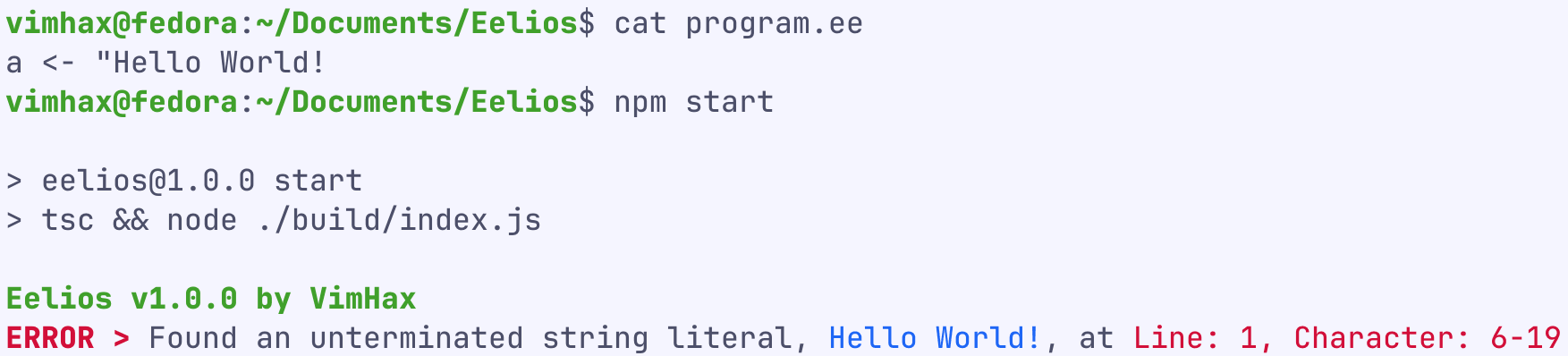
At this stage basic syntax errors are caught by the lexer. For example String literals with missing end quotes, "Hello World!. However a <- 12 + <- 23 will not be flagged by the lexer as all the individual tokens are valid.
Parser
The parser transforms the tokens to an Abstract Syntax Tree. The AST represents the entire Eelios program as a tree data structure.
a <- 12 + 23.Akin to the lexer, the parser calculates and stores the source code locations for all the AST nodes. *To calculate the location of a node the parser typically takes the starting position of the first child token / node and the ending position of the last child token / node.
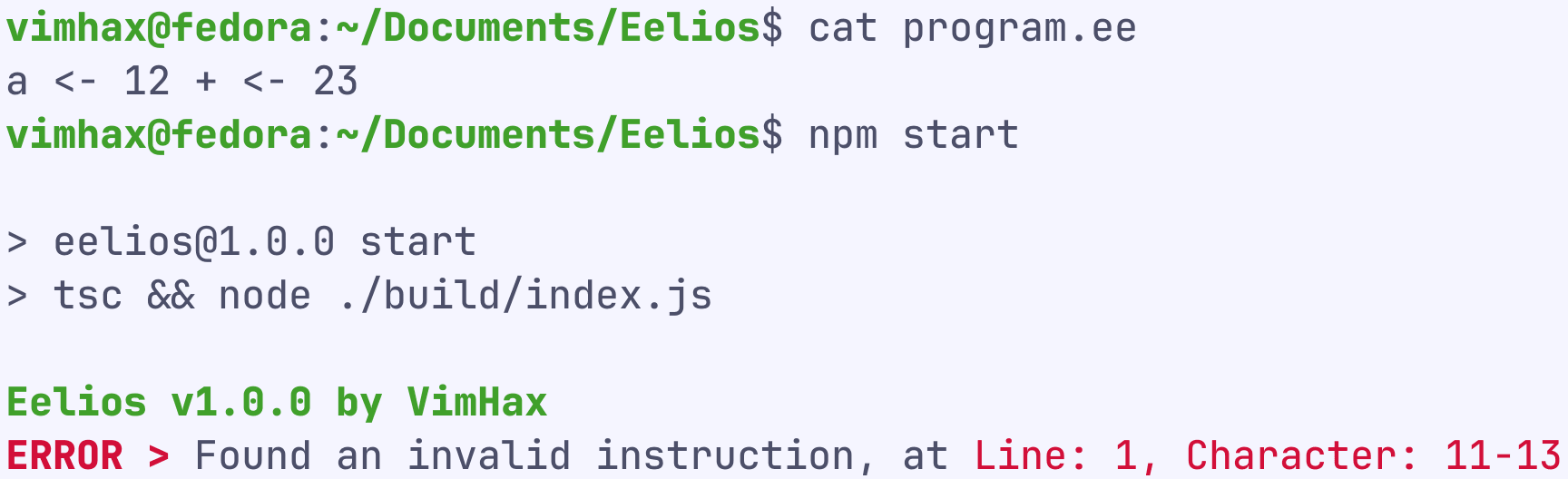
The parser understands the entirety of the Eelios syntax and is therefore able to catch all the syntax errors the lexer may have missed. For example the syntax error in a <- 12 + <- 23, which the lexer misses, is instead caught by the parser.
Both the lexer, and in extension the parser, ignore whitespaces and comments in the source code entirely. For the scope of Eelios this is acceptable, however this decision means the current AST is unable to power a hypothetical automatic code formatter (or at least do it well).
*For the AssignInstructionNode in the diagram that would mean the starting position of LValueVariableNode (which itself is the starting position of Ident) and the ending position of BinaryNode (which itself is the ending position of NumberLiteralNode, which itself is the ending position of NumLit).
Evaluator
The evaluator attempts to execute the top level Instruction (which is what an Eelios program is) by traversing the AST.
public evaluate(): null | Value {
  return this.evaluateInstructionNode(this.instruction);
}
The evaluator operates in 2 modes, an Instruction evaluation mode (which is the initial mode) and an expression evaluation mode. Most behavior is shared between these modes, except what happens when the evaluator comes across an Instruction.
Instruction evaluation mode
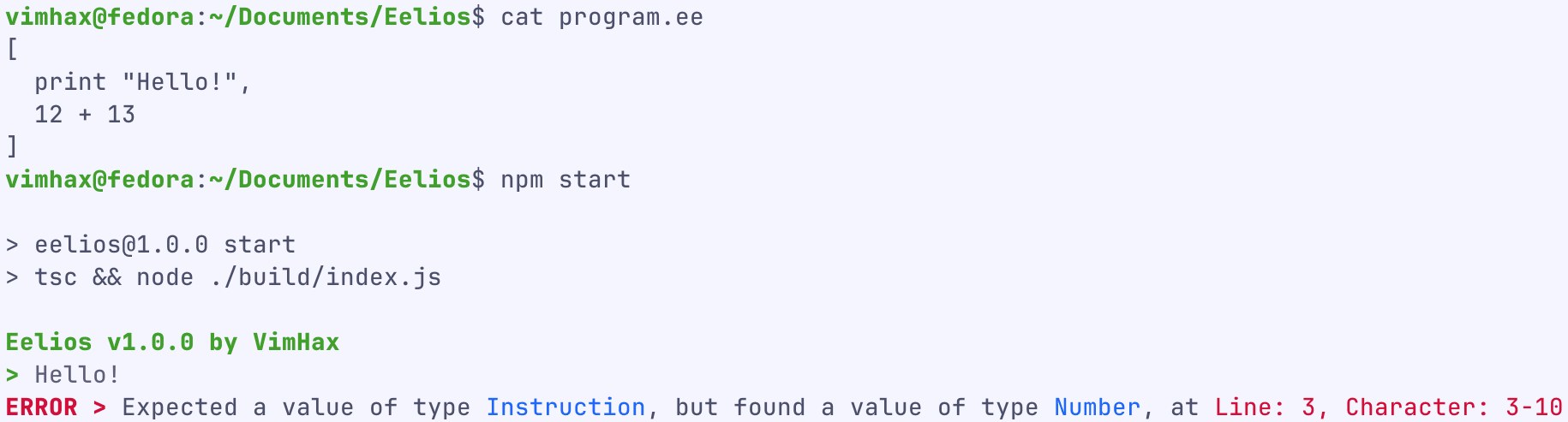
In this mode, when the evaluator is traversing the AST it's expecting to come across InstructionNodes directly, which can be immediately resolved to an Instruction, or come across expression nodes which, after undergoing execution, result in an Instruction. If this expectation is met the evaluator proceeds to execute the resolved Instruction immediately. If unmet the evaluator exits with an error.
Expression evaluation mode
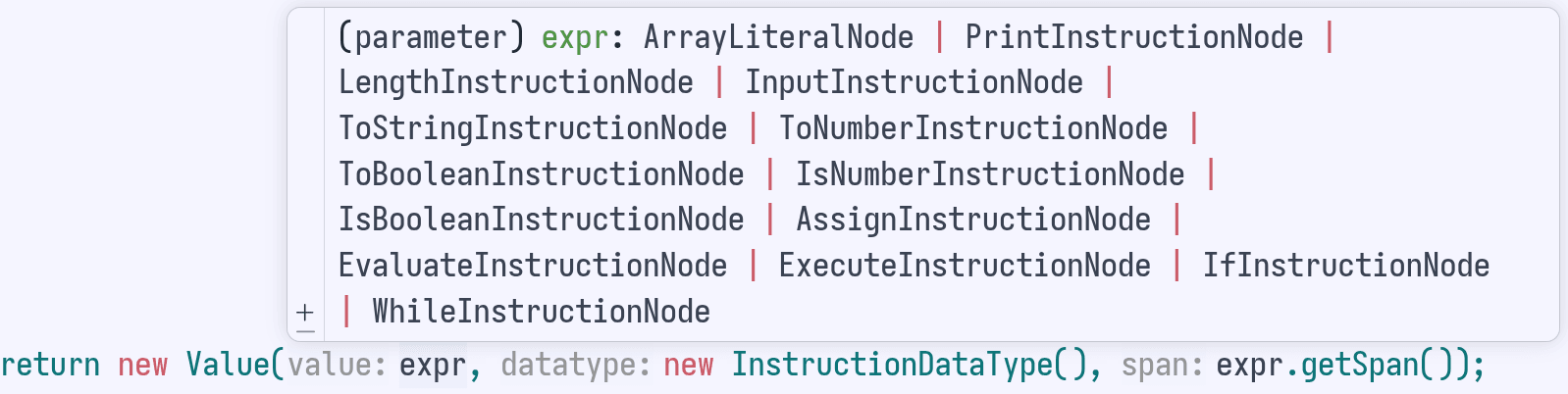
In this mode the evaluator executes expression nodes it comes across when traversing. If the evaluator is met with an InstructionNode, instead of immediately executing it (like in the Instruction evaluation mode) the Instruction is instead treated as data which it then bubbles back up. When Instructions are being "treated as data" the evaluator stores a reference to the AST node which represents the Instruction.
Instruction.Switching modes
The interpreter starts out in the Instruction evaluation mode and switches to the expression evaluation mode when data is expected to be produced (to either be stored in a variable, be a function argument, used for I/O, etc.). Once data is produced the interpreter switches back to the previous mode.
This is the fundamental difference between Instructions and expressions, Instructions do not produce any data (akin to void in other languages but Eelios does not have a void data type).
To see how the interpreter switches modes in practice all the points of interest in the simple function_syntax.ee program are marked below.
#(1 Ins)
[
  #(2 Ins)
  add <-
    #(3 Expr)
    ( a: Number, b: Number ) => Number
      #(6 Ins)
      [
        #(7 Ins)
        sum <-
          #(8 Expr)
          a + b,
        #(9 Ins)
        eval
          #(10 Expr)
          sum
      ],
  #(4 Ins)
  sum <-
    #(5 Expr)
    add(2, 3),
  #(11 Ins)
  print
    #(12 Expr)
    sum
]
> 5The comments denote when and in what mode the interpreter would be in when executing the line below it. The comments are written in the format #(<execution order> <*Ins*truction evaluation mode or *Expr*ession evaluation mode>).
Explicitly switch modes
Eelios has a built-in function, exec, that is able to execute Instructions within an expression, instead of the default behavior of treating it as data. exec is able to do this by making the interpreter switch to the Instruction evaluation mode.
Since exec is able to execute Instructions within an expression and all expressions in Eelios must produce data (and Instructions don't), exec requires the Instruction it executes to eventually return a value with eval.
#(1 Ins)
[
  #(2 Ins)
  instructions <-
    #(3 Expr)
    [
      #(4 Expr), (9 Ins)
      print
        #(10 Expr)
        "Hello",
      #(5 Expr), (11 Ins)
      eval
        #(12 Expr)
        3
    ],
  #(6 Ins)
  print
    #(7 Expr)
    exec(
      #(8 Ins)
      instructions
    )
]
> Hello
> 3
Note how the interpreter goes through the same Instructions twice, first in expression evaluation mode and again (due to exec) in Instruction evaluation mode. In the first pass the interpreter is treating the Instructions as data (not executing it) and stores it in the instructions variable. The second pass executes them, which is why the expressions within the Instructions (line 10 and line 14) now get computed.